X-keys®



Macro Works Software for OS-X
Technical Bulletin RE: Mac OS 10.4 (Tiger)
Apple has released an update, 10.4.3 (http://www.apple.com/ downloads/macosx/), which corrects the compatibility issues we experienced with previous versions. If you are using OS 10.4 (Tiger), please update to version 10.4.3, uninstall MacroWorks from the system and reinstall MacroWorks to use our X-keys devices.
Macro Works for OS-X allows the following X-keys USB devices to be programmed and operated on a Mac OS-X system:
- X-keys Stick
- X-keys Desktop
- X-keys Foot Pedal
- X-keys Professional
- X-keys Jog & Shuttle Editor
- X-keys Joystick Controller
- X-keys Switch Interface
- X-keys Matrix Board
We also offer support for developers here: OSX Developer Info.
Macro Maker and Macro Manager
Macro Works consists of two programs: Macro Maker and Macro Manager. Macro Maker is used to create shortcuts for the keys. Macro Manager assigns those shortcuts to one or more X-keys connected to your system.
Please note: Macro Manager must be running on your system for the X-keys to work.
Download Macro Works here: MacroWorksOSXInstall.dmg (5.1 MB)
Programming with Macro Works for OS-X
Programming a Key with Macro Maker
-
This is a very basic tutorial illustrating how you would program the Copy (Command+C)
command into a key on the X-keys.
- Start Macro Maker from a desktop alias or from your Applications folder
- Macro Maker will open with a graphic profile of your X-keys
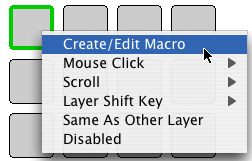
- Click on the key you wish to program
- Select Create/Edit Macro
- The programming window will open
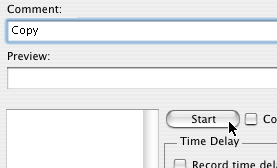
- Enter a name for this macro (for your reference) in the “Comment” field and click the Start button
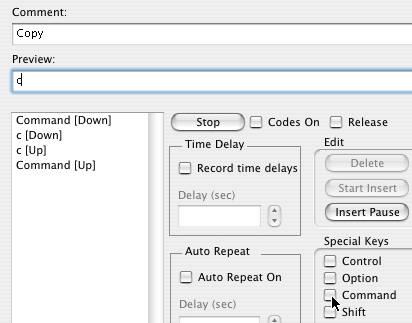
- Since the sequence we are programming starts with a modifier key, select the Special Keys check box for the Command key (notice that “Command [Down]” appears in the programming field)
- Press and release the “C” key (these keystrokes also appear in the programming field)
- Uncheck the Command key box
- Click the Stop button
- Click the OK button
- When you are finished programming the keys, save the file and close Macro Maker

Assigning a Profile to the X-keys with Macro Manager
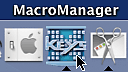
- Start Macro Manager from the task bar or applications folder
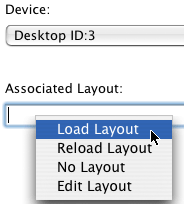
- Click in the “Associated Layout” field and select “Load Layout”
- Open the layout you saved in Macro Maker
- Close Macro Manager
Accessories | Developer´s Corner | Resources | Support
Shopping Cart | Checkout | Privacy Policy | Site Map
X-keys, Y-mouse, RailDriver and The No Slogan Company are Trademarks of P.I. Engineering, Inc.
Copyright © 2006 P.I. Engineering, Inc. All Rights Reserved.
101 Innovation Parkway
Williamston, MI U.S.A. 48895
1-517-655-5523
FAX: 1-517-655-4926
www.piengineering.com | www.xkeys.com | www.ymouse.com | www.raildriver.com
Visit Our New Divisions: