Free Resources



X-keys Legend Maker
X-keys Legend Maker Utility simplifies printing key legends based on the description of your key macros. Legend Maker also makes it easy to print white text on a black background to accent the LED backlighting on the X-keys Stick, Jog & Shuttle Editor, and Joystick Controller. This brief tutorial will show you how to print a set of custom legends for your Stick.
Step 1
Launch Legend Maker from the Option Menu in Macro Maker. Legend Maker will open with text from the captions field in your X-keys profile.
Step 2
Select all of the keys with the Ctrl+A command (or by holding the Shift key down and clicking on each key) and click on the Background Color icon. Choose Black for the color and click the OK button.
Step 3
Click on the Font icon and change the Font to bold and the color to white.
Step 4
Print.
Step 5
Cut the legends, pop off the clear key caps and install them.
Backlighting options are found on the pull down menu. Assign a key to control the backlighting, or set it on or off. The backlighting state effects all keys, not just the key selected.
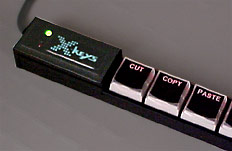
Now sit back and bask in the glow of the LED backlighting and the satisfaction of a task well done.
Accessories | Developer´s Corner | Resources | Support
Shopping Cart | Checkout | Privacy Policy | Site Map
X-keys, Y-mouse, RailDriver and The No Slogan Company are Trademarks of P.I. Engineering, Inc.
Copyright © 2006 P.I. Engineering, Inc. All Rights Reserved.
101 Innovation Parkway
Williamston, MI U.S.A. 48895
1-517-655-5523
FAX: 1-517-655-4926
www.piengineering.com | www.xkeys.com | www.ymouse.com | www.raildriver.com
Visit Our New Divisions: