Free Resources



Flight Simulation
From simply adding an X-keys Desktop under the monitor to emulate an F-16 ICP, to using the X-keys Matrix board for all the switches in a full blown cockpit, these guys have taken advantage of X-keys versatility and reliability to move one step closer to virtual reality in their flight simulations.
New X-keys Matrix Review in Computer Pilot Magazine
“The Matrix can be a daunting undertaking to an electronics beginner
like I was. But it quickly turns into a fun adventure with big rewards at
the end. It is great way to get a more useful and realistic cockpit. There
is nothing like reaching for the switch instead of watching it being
flipped on-screen. At only USD$59.99, I highly recommend it to any
cockpit builder – www.x-keys.com.” — Matt Edwards
Read Matt's full review here: xkeys_comppilot.pdf
Visit: http://www.computerpilot.com/
Snake 122's Great X-keys Adventure
|
"I first learned about the X-keys Matrix Board from Flareless. I love my X-keys Matrix so much, that I wrote an article for the Feburary 2006 issue of Computer Pilot Magazine on how others can use the X-keys Matrix Board to add switches to their own cockpits. It was a great adventure with big rewards at the end."
--Matt “Snake122”Edwards Read more about Matt and his X-keys Matrix Board adventures at: http://sapphire.indstate.edu/~medwards11/cockpit.htm
|
X-keys Review in PC Pilot
“The extent to which this enhances the feeling that you're controlling an aircraft, instead of operating a computer, is surprising; doing away with the mouse, in particular, makes a significant difference.” — Iain Dawson
Read Iain’s full review here: xkeyspcp28.pdf
Click here to visit http://www.pcpilot.net/
Flareless Goes X-keys
“For someone with a limited hardware background, the X-Keys Matrix allowed me to add some powerful features to my cockpit quickly and easily. It's really a great product.” – Richard “Flareless” Sherkin
Thanks to Flareless for sharing these images from his custom cockpit and this thread: http://forums.frugalsworld.com/vbb/showthread.php?t=57093 describing his installation of the X-keys Matrix board.
Flattop's custom cockpit features an inverted X-keys Pro.
Thanks to Bruno "Flattop" Mainardi and Gèn. Jim "Spyder" Beattie for these pictures.
Visit their site: www.quebecairforce.com
For more pictures of Flattop's amazing simulator, visit: Flattop's Cockpit on the Quebec Airforce site.
Maestro's X-keys ICP
“X-keys = life, no X-keys = death." -- Lance "Maestro" Scott 209th Delta Hawks
Bigfoot's X-keys Desktop
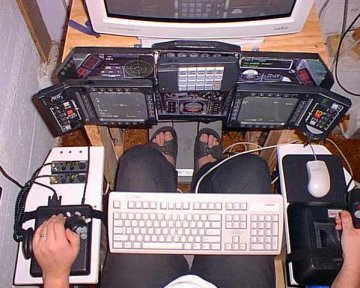
"My small X-Keys unit is just the right size for my F-16 cockpit's ICP panel and is the one piece of equipment I never have to worry about. It just works flawlessly and was easy to setup". -- Troy “Bigfoot” Fisher, DCO, 209th Delta Hawks
Godwerb's Priceless ICP
"My X-Keys???.........Priceless. I use it for ICP panel emulation. It is a breeze to configure, always works, and looks good." -- Steve “Godwerb” Altimari 209th Delta Hawks
Speaker's control panel triggers an X-keys Matrix Board
"There are 60 separate buttons on this front panel. I used the X-Keys keyboard Matrix controller and the buttons from an old IBM keyboard. " -- Michael "Speaker" Bradley
Read more about it on the frugalsworld.com forums.
Crash uses an X-keys Desktop for his ICP.
"We are using the 20 key PS/2 unit to simulate the ICP panel in FALCON 4.0. It fits well between the Masterpilot Quickshots that are being used as MFDs and functions well in the daisy chain with the MFDs, and CH Products or THRUSTMASTER HOTAS gear." -- Dan “Crash” Crenshaw
Froglips started with the X-keys desktop for his ICP
"I was particularly interested in the 20 key device because of its compact size and remarkable resemblance to an F-16's ICP (Integrated Control Panel)." -- Kurt “Froglips” Giesselman
Accessories | Developer´s Corner | Resources | Support
Shopping Cart | Checkout | Privacy Policy | Site Map
X-keys, Y-mouse, RailDriver and The No Slogan Company are Trademarks of P.I. Engineering, Inc.
Copyright © 2006 P.I. Engineering, Inc. All Rights Reserved.
101 Innovation Parkway
Williamston, MI U.S.A. 48895
1-517-655-5523
FAX: 1-517-655-4926
www.piengineering.com | www.xkeys.com | www.ymouse.com | www.raildriver.com
Visit Our New Divisions: