Free Resources



Using Windows Alt Key Commands
We frequently get questions about replacing a series of mouse clicks with the single press of a key on the X-keys. The Alt+Key Menu Commands found in most Windows compatible programs make this a simple task.
Windows Menus
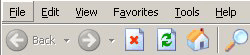
When you press the “Alt” Key on your keyboard, most Windows Applications will underline the letter of the key which will open a menu. In the example here from Internet Explorer, “Alt+F” will open the File menu, “Alt+E” will open the Edit menu, “Alt+V” opens the View menu, “Alt+A” opens the Favorites Menu, “Alt+T” opens the Tools Menu, and “Alt+H” will open the Help menu.
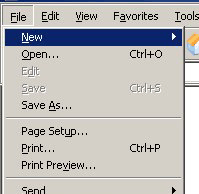
In this example “Alt+F” has opened the File menu. Once the menu is open, choices within the menu have underlined letters indicating the keys which will open them. Hit the “N” key to open the New submenu.
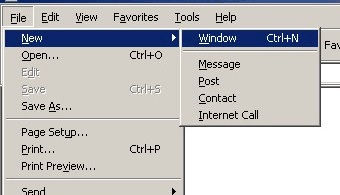
Submenus will also display underlined letters to indicate the key for that choice.
The “W” key will open a new window in Internet Explorer. Programming this sequence into your X-keys will replace three mouse moves and clicks with one key press.
You may notice that some of the selections have dedicated “hot keys” listed like “Ctrl+O” (Open) “Ctrl+S“ (Save) and “Ctrl+P” (Print). These key combinations provide a shortcut to the function without even opening the menu. In the example above, programming the “Ctrl+N” combination into your X-keys will serve the same purpose as the “Alt+F N W” sequence we just described.
Another good source of keyboard shortcuts is the Help file. Often opening the help file and searching for “keyboard shortcuts” or “hot keys” will lead you to a list of available combinations of Shift, Ctrl, Alt, F1-F12, or other keys for the program.
Accessories | Developer´s Corner | Resources | Support
Shopping Cart | Checkout | Privacy Policy | Site Map
X-keys, Y-mouse, RailDriver and The No Slogan Company are Trademarks of P.I. Engineering, Inc.
Copyright © 2006 P.I. Engineering, Inc. All Rights Reserved.
101 Innovation Parkway
Williamston, MI U.S.A. 48895
1-517-655-5523
FAX: 1-517-655-4926
www.piengineering.com | www.xkeys.com | www.ymouse.com | www.raildriver.com
Visit Our New Divisions: